|
|
 |
|
Joe Services
|
Rent a Geek (see
below for more details) If you are shopping for
a new computer or printer contact me for some free advice. Let me know
what you are searching for & I will do the research for you. I will
then send you an email with my recommendations. The email will include
links to the stores that are selling that product. You purchase the
computer or printer then I set it up for you on our previously scheduled
appointment. I will then show you how to use it.
New computer setup, removal of trialware. Install free virus & office programs. Transfer Documents and Pictures to the new computer. Sync Internet browsers. Safe Setup Service Maintenance Program: Six month or One Year Computer Checkups - Check Security settings, scan and remove malware infections, install other important updates, backup of important files and photos on your backup device, etc.
|
|
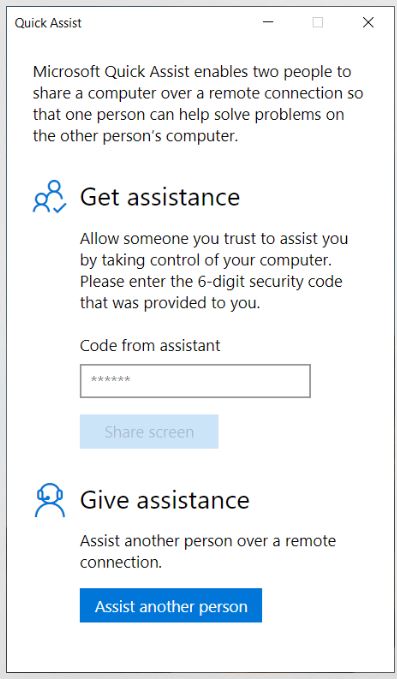
Microsoft PC Remote - Quick Assist App - already installed on your PC computer. See details below.
Mac Remote not available. |
|
Rent-A-Geek, how it
works.
I offer a free service that guides you through the Windows computer buying steps safely. When you are ready, please contact me to get the process going. I start by reviewing my notes and any comments that we discussed on my last visit, in reference to what type of computer you want next. There are 3 styles of Computers:
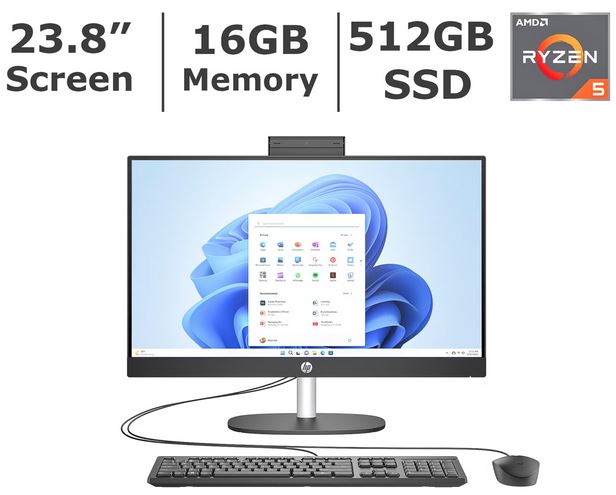
Laptop - The Cons and Pros of each: Laptop - Biggest Pro: Portable: can use plugged into power or without on battery. Biggest Con: Battery fails after two years in some cases, may need to be replaced ($150 additional cost). Desktop - Pro: can take off cover to add or remove parts. Con: Too many wires running from monitor to back of tower. All in One - Pro: compact design, no wires, webcam, speakers, etc. built in. 24" screen. Con: I cannot think of any, which is why I am recommending this type of computer. How it works: Most stores start the new sales on Sundays, so on Mondays I email my recommendations. The email contains suggestions like this (note that this offer has expired): $500 (sale, was $750) HP 23.8" All-in-One Desktop PC, AMD Ryzen 5, 16GB RAM, 512 GB SSD
When you click on the link, your Internet browser will open to the store that sells that computer. There you can see details and a photo of the computer. As you scroll down there are also reviews from people who also purchased this computer. Then you purchase the computer that you like out of my suggestions. You can either buy it online and ship it to your home or go to the local store and pick it up. If you go to the store, just buy the computer. The salesperson may try to talk you into buying additional things that you do not need. If they offer to setup the computer for you, turn them down, that is my job. A store in Leesburg, FL tricked two of my clients into purchasing a "Bundle Package" that sold them programs that I did not recommend. Then the store technician took the computer out of the box and spent 2+ hours "trying" to set it up. They screwed up the computer because they were asking for email addresses and passwords that the clients did not have with them. I am Boycotting that store for taking advantage of Seniors! When the Computer arrives, you leave it in the box. When I arrive, I start on your old computer, backing up your files and photos onto flash drives or external hard drives. Then I confirm your wifi password and your Microsoft Account that is required to setup the new computer. The final step is to sync your browsers so your Favorites/Bookmarks can be moved to your new computer. Then I'll take the new computer out of the box, and ask you to turn it on. Then the fun begins. If you would like to use this free Rent-a-Geek Service, please contact me when you are ready. |
|
Its like I am sitting right next to you! Remote PC setup is amazing. If you moved away from the Lake County Florida area, no worries for Microsoft PC users thanks to a program call Quick Assist. The way it works is you give me your zip code, and I search for the right computer at your local stores. Then I email you what I find. You buy the computer that you like. If you buy it in the store, do not buy any additional software or services. Take the sealed carton home, do not let the store set it up. Then on our appointment, I'll give you the code number, and will take over your mouse on your old computer first. You will need a flash drive or external hard drive. I will then backup your documents, photos and important files. I will sync your Internet browsers so you can keep the Bookmarks/Favorites and website passwords. Finally I will confirm your wifi password and your Microsoft account information. Then the fun begins as I walk you through the steps setting up your new computer. Finally, when the desktop appears, I will have you open the Quick Assist program that is already on the new computer, and will take over the mouse and complete the setup.
The final step is to bring over your files that are on the flash drive or external hard drive. I will sign into the Internet browsers and set up everything the way it was on your previous computer. If you are tossing your old computer I will need to return to it to wipe it for you. When you are ready, please contact me for your Remote PC Computer setup. |


 Desktop -
  New All in One -